Repository 패턴을 사용해서 간단한 로그인 기능을 구현해 보았는데 그건 어떤 식으로 Repository 패턴을 사용하는지에 대한 느낌만 알기 위해 간단 버전으로 구현한 내용이고 이번 시간에는 회원가입 시 패스워드 암호화, 로그인 성공 시 jwt 토큰 발급, 토큰 검사 기능을 구현한 로그인 기능을 구현해 보겠습니다.
구현에 앞서 사용되는 모듈들에 대해 알아보겠습니다.
JsonWebToken(jwt)
JWT는 JSON 객체를 사용하여 사용자 정보를 안전하게 전송하기 위한 개방형 표준입니다.
로그인 성공 시 서버에서 사용자의 정보를 기반으로 JWT를 생성하여 클라이언트에 반환합니다. 이후에 인증이 필요한 기능에 대한 요청 발생 시 클라이언트는 JWT와 함께 서버에 요청하고 서버는 이를 검증하여 해당 요청에 대한 권한을 결정합니다.
JWT를 클라이언트에 저장하여 사용함으로써 서버에 부담을 줄여줍니다.
// jwt 라이브러리 설치
npm install @nestjs/jwt
Passport
Passport는 가장 인기 있는 NodeJs 인증 라이브러리로 로컬 인증, OAuth, JWT 등 400개 이상의 다양한 전략적 인증 방식을 지원합니다.
Passport는 요청 객체에 인증 정보를 추가할 수 있으며 구성이 유연하고 확장이 가능합니다..
// passport 라이브러리 설치
npm install @nestjs/passport passport-jwt
Bcrypt
Bcrypt는 비밀번호를 안전하게 저장하기 위한 해싱 라이브러리입니다.
장점으로는 해싱은 단방향 함수이기 때문에 원본 비밀번호를 복구할 수 없으며 Salt를 사용하여 비밀번호를 무작위로 해싱하여 레인보우 테이블 공격 등의 보안 위협을 방지합니다.
Salt : 비밀번호에 추가되는 무작위 데이터이며 비밀번호 해싱 과정에서 비밀번호에 추가됩니다.
// bcrypt 라이브러리 설치
npm install bcrypt
Custom decorators
Custom decorator는 클래스, 메서드, 속성, 매개변수에 적용될 수 있는 종류의 선언을 말하며 메타데이터를 추가하거나 메서드의 동작을 변경하는 데 사용됩니다.
Controller의 메서드에 HTTP 요청 객체의 특정 부분에 접근하여 데코레이터를 만들 수 있습니다.
회원가입
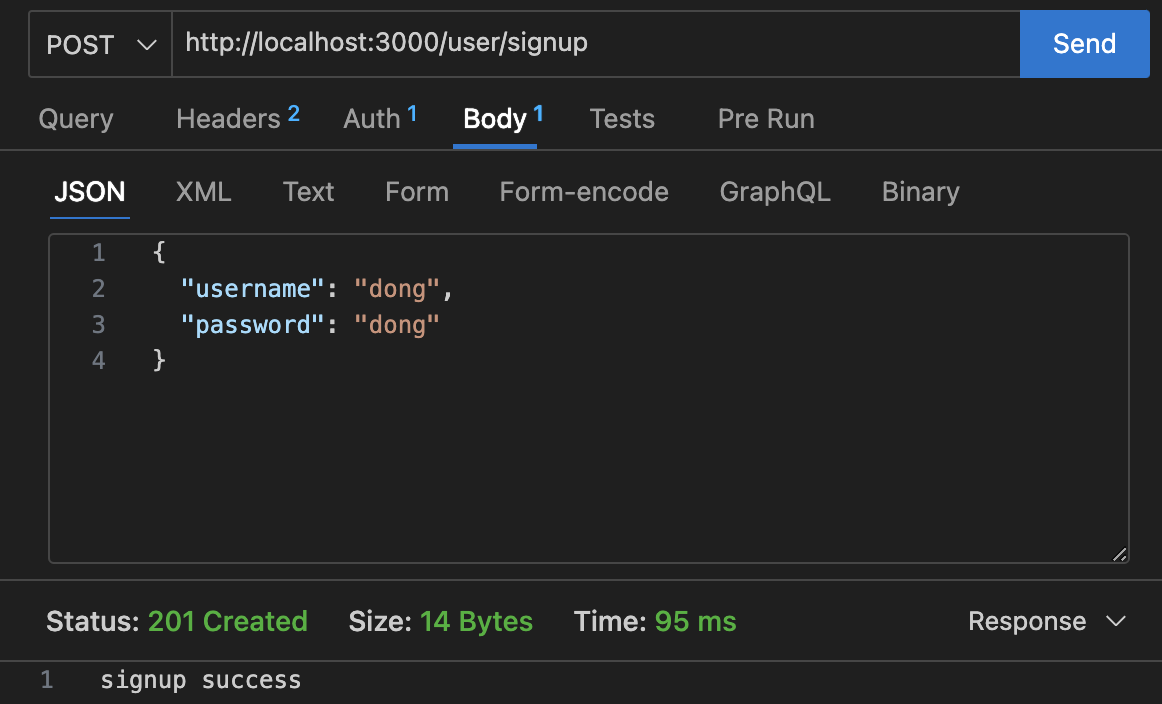
클라이언트에서 username, password를 전달받아 해당 username을 이미 사용 중인지 판단 후 없다면 password를 암호화한 후 데이터베이스에 저장합니다.
// config/typeorm.config.ts
import { TypeOrmModuleOptions } from '@nestjs/typeorm';

export const TypeOrmConfig: TypeOrmModuleOptions = {
  type: 'postgres',
  host: 'localhost',
  port: 5432,
  username: 'postgres',
  password: 'postgres',
  database: 'sample_db',
  entities: [__dirname + '/../**/*.entity.{js,ts}'],
  synchronize: true,
};
// user/user.module.ts
import { Module } from '@nestjs/common';
import { UserService } from './user.service';
import { TypeOrmModule } from '@nestjs/typeorm';
import { User } from './entities/user.entity';
import { UserController } from './user.controller';
import { UserRepository } from './user.repository';
@Module({
imports: [TypeOrmModule.forFeature([User])],
controllers: [UserController],
providers: [UserService, UserRepository],
exports: [UserService],
})
export class UserModule {}// user/user.controller.ts
import { Body, Controller, Post } from '@nestjs/common';
import { UserService } from './user.service';
import { UserDto } from './dto/user.dto';
@Controller('user')
export class UserController {
constructor(private userService: UserService) {}
@Post('/signup')
async signUp(@Body() userDto: UserDto): Promise<string> {
return this.userService.signUp(userDto);
}
}// user/user.service.ts
import { Injectable } from '@nestjs/common';
import { UserRepository } from './user.repository';
import { UserDto } from './dto/user.dto';
import * as bcrypt from 'bcrypt';
@Injectable()
export class UserService {
constructor(private userRepository: UserRepository) {}
async signUp(userDto: UserDto) {
const { username, password } = userDto;
const findUser = await this.userRepository.findUser(username);
if (findUser) {
throw new Error('user already exists');
}
const _password = await this.hashToPassword(password);
await this.userRepository.signUp(username, _password);
return 'signup success';
}
// bcrypt 라이브러리를 사용하여 패스워드 해싱
async hashToPassword(password: string) {
return await bcrypt.hashSync(password, 10);
}
}// user/user.repository.ts
import { Repository } from 'typeorm';
import { User } from './entities/user.entity';
import { InjectRepository } from '@nestjs/typeorm';
import { Injectable } from '@nestjs/common';
@Injectable()
export class UserRepository {
constructor(
@InjectRepository(User)
private readonly userRepository: Repository<User>,
) {}
// 회원가입
async signUp(username: string, password: string): Promise<string> {
const checkUsername = await this.userRepository.findOneBy({ username });
if (checkUsername) {
return 'username already exists';
}
const user = await this.userRepository.create({ username, password });
await this.userRepository.save(user);
return 'signup success';
}
// 같은 유저명을 가진 유저가 있는지 확인
async findUser(username: string): Promise<User | null> {
return this.userRepository.findOneBy({ username });
}
}

로그인
회원가입 완료 후 로그인 시도 시 username과 password를 검증합니다.
username이 존재하는지 판단하고 저장되어 있는 password와 입력받은 password가 맞는지 검증합니다.
입력받은 정보가 맞다면 jwt 토큰을 클라이언트에 전달합니다.
// auth/auth.module.ts
import { Module } from '@nestjs/common';
import { AuthController } from './auth.controller';
import { AuthService } from './auth.service';
import { UserModule } from 'src/user/user.module';
import { JwtModule } from '@nestjs/jwt';
import { TypeOrmModule } from '@nestjs/typeorm';
import { User } from 'src/user/entities/user.entity';
import { UserRepository } from 'src/user/user.repository';
import { JwtStrategy } from './jwt.strategy';

@Module({
  imports: [
    TypeOrmModule.forFeature([User]),
    JwtModule.register({
      global: true,
      secret: 'secretKey', // jwtService.sign에서 사용할 비밀키
      signOptions: { expiresIn: '60s' },
    }),
    UserModule,
  ],
  controllers: [AuthController],
  providers: [AuthService, UserRepository, JwtStrategy],
})
export class AuthModule {}
// auth/auth.controller.ts
import { Body, Controller, Post } from '@nestjs/common';
import { AuthService } from './auth.service';
import { SignInDto } from './dto/signin.dto';
@Controller('auth')
export class AuthController {
constructor(private readonly authService: AuthService) {}
@Post('signin')
async signIn(@Body() signInDto: SignInDto) {
return this.authService.signIn(signInDto);
}
}// auth/auth.service.ts
import { Injectable, UnauthorizedException } from '@nestjs/common';
import { SignInDto } from './dto/signin.dto';
import { JwtService } from '@nestjs/jwt';
import * as bcrypt from 'bcrypt';
import { Payload } from './dto/payload.interface';
import { UserRepository } from 'src/user/user.repository';
@Injectable()
export class AuthService {
constructor(
private readonly userRepository: UserRepository,
private readonly jwtService: JwtService,
) {}
async signIn(signInDto: SignInDto) {
// 로그인 요청한 회원이 데이터베이스에 있는 회원인지 확인하는 로직
const { username, password } = signInDto;
const user = await this.userRepository.findUser(username);
if (!user) {
throw new UnauthorizedException({ messeges: 'User Not Found' });
}
// 가져온 회원 정보 중 패스워드가 맞는지 검증
const compoarePassword = await this.compoarePassword(
password,
user.password,
);
if (!compoarePassword) {
throw new UnauthorizedException({ messeges: 'Password Not Match' });
}
// 토큰 발급
const payload: Payload = {
id: user.id,
username: user.username,
};
const accessToken = await this.jwtService.sign(payload);
return { message: 'login success', accessToken };
}
// 입력받은 패스워드와 데이터베이스에 저장된 패스워드를 비교하는 메서드
// bcrypt는 단방향 해싱 라이브러리기 때문에 boolean 타입으로 반환
async compoarePassword(
password: string,
userPassword: string,
): Promise<boolean> {
return await bcrypt.compare(password, userPassword);
}
// 해당 유저가 있는지 확인
async findUser(username: string) {
return await this.userRepository.findUser(username);
}
}

토큰 검증
유저 정보를 조회하는 서비스 로직을 구현하여 사용자 인증과 인가를 과정을 거쳐 데이터를 반환해 주는 과정을 살펴보겠습니다.
jwt, guard, custom decorators가 어떤 역할을 수행하는지를 파악하는 것이 포인트입니다.
jwt.strategy.ts와 user.guard.ts가 토큰의 유효성 검증을 수행하지만 목적이 다릅니다.
jwt.strategt.ts 같은 경우 passport에 의해 validate 메서드가 자동으로 호출되며 토큰을 검증한 후 payload를 가져옵니다. 가져온 payload에서 유저의 정보를 확인합니다. 즉, 사용자를 식별하는 데 사용됩니다.
반면 guard는 jwt 토큰의 유효성을 검증하고 유효한 토큰을 가진 요청만 통과시킵니다. 즉, 유효성을 검증하여 접근 제어를 수행합니다.
// jwt.strategy.ts
import { ExtractJwt, Strategy } from 'passport-jwt';
import { PassportStrategy } from '@nestjs/passport';
import { Injectable, UnauthorizedException } from '@nestjs/common';
import { AuthService } from './auth.service';
import { Payload } from './dto/payload.interface';

@Injectable()
export class JwtStrategy extends PassportStrategy(Strategy) {
  // PassportStrategy를 상속받아 JwtStrategy 클래스를 정의합니다. Strategy는 passport-jwt의 Strategy를 의미
  constructor(private readonly authService: AuthService) {
    super({
      jwtFromRequest: ExtractJwt.fromAuthHeaderAsBearerToken(), // 요청에서 JWT를 추출하는 방법을 정의. 여기서는 Authorization 헤더의 Bearer 토큰에서 JWT를 추출
      ignoreExpiration: false, // 토큰의 만료를 무시할지 여부를 결정. false로 설정하면 만료된 토큰은 거부
      secretOrKey: 'yourSecretKey', // JWT를 검증할 때 사용할 비밀키 또는 공개키를 지정. 실제 환경에서는 환경변수 등을 통해 관리하는 것이 좋음
    });
  }

  // Passport 전략에서 제공해야 하는 validate 메서드를 구현
  // validate 메소드는 passport에 의해 자동으로 호출되며 JWT의 페이로드를 받아 유효성을 검사한 후 유효하다면 사용자 정보를 반환
  async validate(payload: Payload): Promise<any> {
    const user = this.authService.findUser(payload.username); // validate 메서드에서는 JWT의 페이로드를 받아 사용자를 찾아 반환

    if (!user) {
      throw new UnauthorizedException({ messeges: 'User Not Found' }); // 사용자가 없다면 UnauthorizedException을 발생
    }

    return payload; // 사용자 정보를 요청 객체에 주입
  }
}
// common/guards/auth.guard.ts
import {
Injectable,
CanActivate,
ExecutionContext,
UnauthorizedException,
} from '@nestjs/common';
import { JwtService } from '@nestjs/jwt';
@Injectable()
export class AuthGuard implements CanActivate {
constructor(private readonly jwtService: JwtService) {}
// canActivate 는 Nestjs의 guard에서 필수적으로 구현해야 하는 메소드
// 현재 요청이 계속 진행 될 수 있는지 여부를 반환
async canActivate(context: ExecutionContext): Promise<boolean> {
// ExecutionContext를 통해 현재 요청에 대한 정보를 가져옴
const request = context.switchToHttp().getRequest();
const token = request.headers['authorization'].split(' ')[1];
if (!token) {
throw new UnauthorizedException();
}
try {
const payload = await this.jwtService.verify(token);
request['user'] = payload;
} catch (error) {
throw new UnauthorizedException();
}
return true;
}
}// common/decorators/user.decorator.ts
import { ExecutionContext, createParamDecorator } from '@nestjs/common';
// Request 요청에서 유저정보만 가져오기 위한 커스텀 데코레이터 작성
export const UserInfo = createParamDecorator(
(_: unknown, ctx: ExecutionContext) => {
const request = ctx.switchToHttp().getRequest();
const user = request.user;
return user ? user.username : undefined;
},
);// user/user.controller.ts
import { Body, Controller, Get, Post, UseGuards } from '@nestjs/common';
import { UserService } from './user.service';
import { UserDto } from './dto/user.dto';
import { User } from './entities/user.entity';
import { AuthGuard } from 'src/common/guards/auth.guard';
import { UserInfo } from 'src/common/decorators/user.decorator';
@Controller('user')
export class UserController {
constructor(private userService: UserService) {}
@Post('/signup')
async signUp(@Body() userDto: UserDto): Promise<string> {
return this.userService.signUp(userDto);
}
@Get('/userinfo')
@UseGuards(AuthGuard) // guard를 통해 토큰을 검증하고 Request에 user 정보를 담음
async userInfo(@UserInfo() username: string): Promise<any> {
// custom decorator를 사용해 Request 요청에서 user 정보만 가져옴
return this.userService.userInfo(username);
}
}// user/user.service.ts
import { Injectable } from '@nestjs/common';
import { UserRepository } from './user.repository';
import { UserDto } from './dto/user.dto';
import * as bcrypt from 'bcrypt';
@Injectable()
export class UserService {
constructor(private userRepository: UserRepository) {}
async signUp(userDto: UserDto) {
const { username, password } = userDto;
const findUser = await this.userRepository.findUser(username);
if (findUser) {
throw new Error('user already exists');
}
const _password = await this.hashToPassword(password);
await this.userRepository.signUp(username, _password);
return 'signup success';
}
async hashToPassword(password: string) {
return await bcrypt.hashSync(password, 10);
}
// 데이터베이스에 유저 정보가 있는지 확인 후 패스워드 정보만 제거한 뒤 클라이언트로 전달
async userInfo(username: string) {
const userInfo = await this.userRepository.userInfo(username);
delete userInfo.password;
return userInfo;
}
}// user/user.repository.ts
import { Repository } from 'typeorm';
import { User } from './entities/user.entity';
import { UserDto } from './dto/user.dto';
import { InjectRepository } from '@nestjs/typeorm';
import { Injectable } from '@nestjs/common';
@Injectable()
export class UserRepository {
constructor(
@InjectRepository(User)
private readonly userRepository: Repository<User>,
) {}
// 회원가입
async signUp(username: string, password: string): Promise<string> {
const checkUsername = await this.userRepository.findOneBy({ username });
if (checkUsername) {
return 'username already exists';
}
const user = await this.userRepository.create({ username, password });
await this.userRepository.save(user);
return 'signup success';
}
// 같은 유저명을 가진 유저가 있는지 확인
async findUser(username: string): Promise<User | null> {
return this.userRepository.findOneBy({ username });
}
// 유저 정보
async userInfo(username: string): Promise<User> {
return await this.userRepository.findOneBy({ username });
}
}

실습 중 에러 상황
jwt 관련 secretOrPrivateKey를 인식하지 못하는 상황이 발생
모듈에도 secret 키를 하드 코딩했는데도 계속적인 오류가 남
[Nest] 34383  - 03/22/2024, 7:46:27 PM   ERROR [ExceptionsHandler] secretOrPrivateKey must have a value
Error: secretOrPrivateKey must have a value
해결
해당 모듈에서 사용해야 하기 때문에 providers에 jwtServcie를 등록한 게 원인
providers의 인스턴스는 각각 존재하기 때문에 새로운 인스턴스가 생성되면서 secret가 사라진 거로 판단
import { Module } from '@nestjs/common';
import { AuthController } from './auth.controller';
import { AuthService } from './auth.service';
import { UserModule } from 'src/user/user.module';
import { JwtModule } from '@nestjs/jwt';
import { TypeOrmModule } from '@nestjs/typeorm';
import { User } from 'src/user/entities/user.entity';
import { UserRepository } from 'src/user/user.repository';

@Module({
  imports: [
    TypeOrmModule.forFeature([User]),
    JwtModule.register({
      global: true,
      secret: 'secretKey', // jwtService.sign에서 사용할 비밀키
      signOptions: { expiresIn: '60s' },
    }),
    UserModule,
  ],
  controllers: [AuthController],
  providers: [AuthService, UserRepository], // <- jwtService를 주입했기 때문에 생긴 오류
})
export class AuthModule {}
해당 로직은 완벽하지 않습니다. 공식 문서에 있는 간결한 코드들도 많지만 로직에 대한 이해를 하기 위해 제 식대로 설정해본 방법입니다.
그렇기에 각 기능들에 대한 역할을 이해하는데 도움이 많이 됐습니다.
헷갈리고 로직이 계속 변경되면서 오래 걸리긴 했지만 아주 뜻깊은 시간이었습니다.
확실히 에러가 나야 이해하는데 도움이 많이 되는 거 같습니다🤣
'Nestjs' 카테고리의 다른 글
| [NestJs] config 사용하기 (0) | 2024.03.30 |
|---|---|
| [NestJs] 클린 코드 알아보기 (0) | 2024.03.28 |
| [NestJs] Repository 패턴 사용해보기 (0) | 2024.03.20 |
| [NestJs] TypeORM 연결하기 (3) | 2024.03.18 |
| [NestJs] Middleware 알아보기 (1) | 2024.03.15 |