
POSITION 이란?
position은 웹페이지를 구성할때 레이아웃의 위치를 지정해 주는 속성이며 top, bottom, left, right를 사용하여 위치를 고정 시킬 수도 있으며 화면이 움직일때 따라 움직이게 하는 등 정적, 동적, 상대적, 절대적인 방식으로 위치를 결정할 수 있다.
position: relative
이전 요소(부모 태그)의 위치를 기준으로 좌표를 지정하는 속성으로 top, bottom, left, right 를 사용하여 위치를 지정 할 수 있다.
더보기
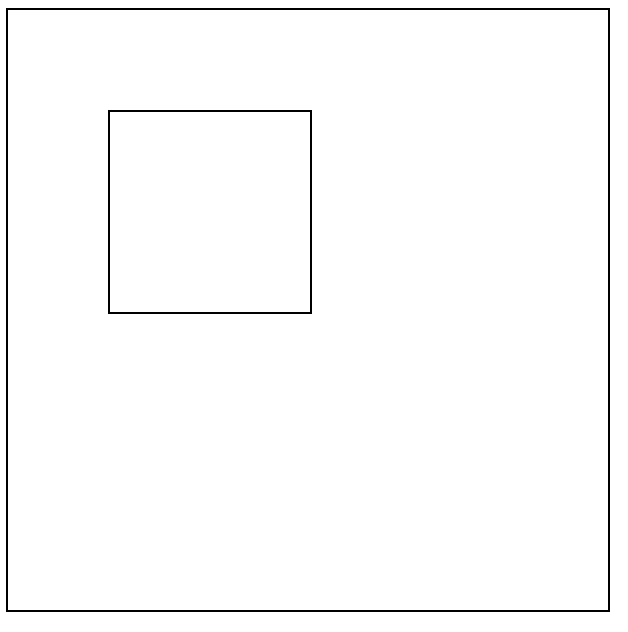
소스 코드
 <!-- css -->
  <style>
    .box {width: 300px;height: 300px;border: 1px solid;}
    .reltest {width: 100px;height: 100px;border: 1px solid;top: 50px;left: 50px;position: relative;}
  </style>

<!-- html -->
<body>

  <div class="box">
    <div class="reltest"></div>
  </div>

</body>
결과
position: absolute
기본 위치는 relative 속성을 가지고 있는 부모의 좌측 상단을 기준으로 지정한다. (부모 태그가 없으면 body 태그 기준)
더보기

소스 코드
- relative 속성과 같이 top: 50px, left: 50px 값을 주었지만 2개의 상자의 위치가 다른것을 볼 수 있다.
- absolute 속성의 기준점은 relative 속성을 가진 부모 태그의 우측 상단이 기준
  <!-- css -->
  <style>
    .box {width: 300px;height: 300px;border: 1px solid;}
    .reltest {width: 100px;height: 100px;border: 1px solid;top: 50px;left: 50px;position: relative;}
    .absoltest {width: 100px;height: 100px;border: 1px solid;top: 50px;left: 50px;position: absolute;}
  </style>
</head>

<!-- html -->
<body>

  <div class="box">
    <div class="reltest">
      <div class="absoltest"></div>
    </div>
  </div>
결과
position: fixed
위치를 고정 시켜 스크롤 동작을 하여도 같은 위치에 고정되어 있다. 주로 네비게이션 바 같은 곳에 사용 된다.
더보기
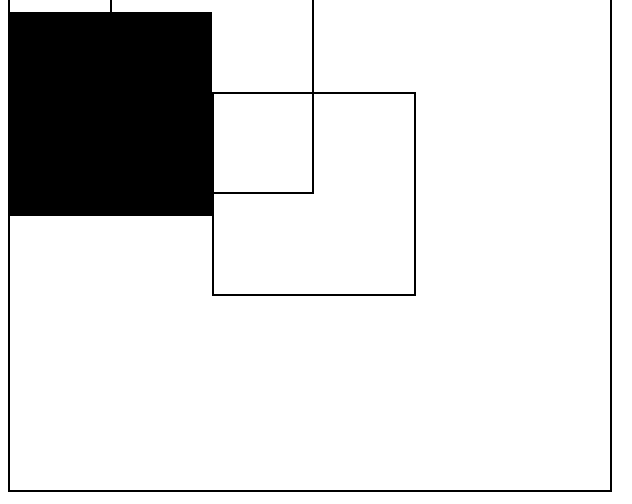
소스 코드
- position: fixed 값을 가진 div를 스크롤 했을때 div가 스크롤에 따라 내려와 다른 div를 가린 모습을 볼 수 있다.
  <!-- css -->
  <style>
    .box {width: 300px;height: 300px;border: 1px solid;}
    .reltest {width: 100px;height: 100px;border: 1px solid;top: 50px;left: 50px;position: relative;}
    .absoltest {width: 100px;height: 100px;border: 1px solid;top: 50px;left: 50px;position: absolute;}
    .fixtest {width: 100px;height: 100px;border: 1px solid;background-color: black;position: fixed;}
    .scroll {width: 500px;height: 2000px;}
  </style>
</head>

<!-- html -->
<body>
  <div class="scroll">
    <div class="fixtest"></div>
    <div class="box">
      <div class="reltest">
        <div class="absoltest"></div>
      </div>
    </div>
  </div>
결과
position: sticky
지정한 위치에서 밖으로 나가지 못하는 속성으로 위치에 따라 fixed 나 absolute 처럼 사용 할 수 있다.
더보기
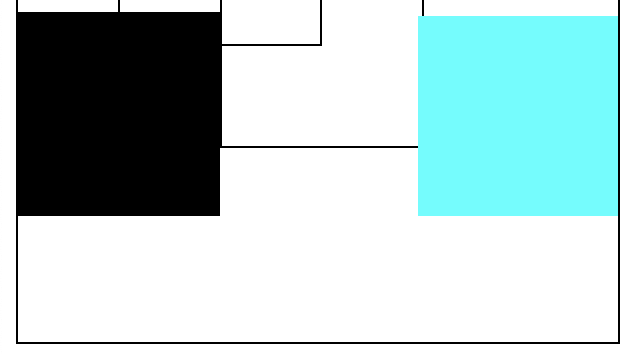
부모 태그 내부에선 fixed와 같이 동작
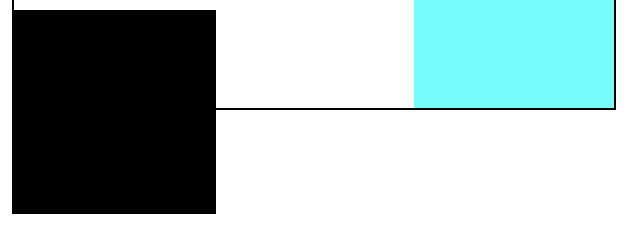
부모 태그의 영역을 벗어나지 못한다.
소스 코드
- sticky 태그를 top: 10px left: 210px에 두고 스크롤을 내렸을때 fixed와 비슷하게 top과 left 값을 유지하면서 내려오지만 부모 태그의 크기는 벗어 날 수 없다.
  <!-- css -->
  <style>
    .box {width: 300px;height: 300px;border: 1px solid;}
    .reltest {width: 100px;height: 100px;border: 1px solid;top: 50px;left: 50px;position: relative;}
    .absoltest {width: 100px;height: 100px;border: 1px solid;top: 50px;left: 50px;position: absolute;}
    .fixtest {width: 100px;height: 100px;border: 1px solid;background-color: black;position: fixed;}
    .scroll {width: 500px;height: 2000px;}
    .stitest {width: 100px;height: 100px;background-color: aqua;top: 10px; left: 210px;position: sticky;}
  </style>
</head>

<!-- html -->
<body>
  <div class="scroll">
    <div class="fixtest"></div>
    <div class="box">
      <div class="reltest">
        <div class="absoltest"></div>
      </div>
      <div class="stitest"></div>
    </div>
  </div>
결과
728x90
'CSS' 카테고리의 다른 글
| [CSS] DISPLAY 를 활용한 테이블 만들기 (0) | 2023.03.02 |
|---|---|
| [CSS] CSS 이해하기 (0) | 2023.03.02 |